
Monitor Your Home Air Quality in Real Time
Overview
Woosh Air is a desktop application designed to help users monitor and maintain optimal indoor air quality. The software integrates with compatible smart thermostats and the Woosh Smart Filter and Air Quality Monitor to provide real-time data on environmental conditions within the home. By tracking parameters such as particulate matter, humidity, and temperature, Woosh Air enables users to make informed decisions about ventilation, filtration, and overall indoor comfort. The application is tailored for individuals seeking to improve their living environment, particularly those concerned with respiratory health, allergies, or general wellness.
Designed with a focus on simplicity and accessibility, Woosh Air offers a user-friendly interface that presents complex air quality data in an intuitive format. It supports both Windows and Mac operating systems, making it widely accessible to home users across different platforms. The software allows users to observe trends in both indoor and outdoor air quality over time, helping identify patterns linked to daily routines, weather changes, or external pollution sources. This data-driven approach empowers users to take proactive steps toward creating a healthier indoor atmosphere.
The developer, Woosh, did not provide additional information about its background or history. However, the product’s design suggests a strong emphasis on wellness technology and smart home integration. Real-world usage scenarios include homes with young children, elderly individuals, or those with asthma and other respiratory sensitivities. The app’s ability to track filter life also supports maintenance planning, reducing the risk of degraded air quality due to outdated filters.
Key Features & Capabilities
- Real-Time Air Quality Monitoring – Displays current levels of airborne particles, temperature, and humidity, allowing users to respond immediately to spikes in pollutants.
- Smart Thermostat Integration – Automatically adjusts air quality settings when connected to a compatible smart thermostat, ensuring continuous protection without manual input.
- Filter Life Tracking – Monitors the remaining lifespan of the Woosh Smart Filter, sending alerts when replacement is recommended to maintain peak performance.
- Indoor and Outdoor Air Quality Trends – Provides historical data visualization to identify patterns over time, helping users correlate air quality with specific activities or environmental factors.
- Comprehensive Dashboard Interface – Offers a centralized view of all air quality metrics, enabling quick assessment of the home environment at a glance.
These features support practical applications such as adjusting ventilation during high-pollution periods, scheduling filter replacements before performance drops, and evaluating the impact of opening windows or using air purifiers. The integration with smart home systems enhances automation, reducing user effort while improving consistency in air quality management. For users with health concerns, this level of insight can lead to measurable improvements in daily comfort and well-being.
User Interface, Workflow & Performance
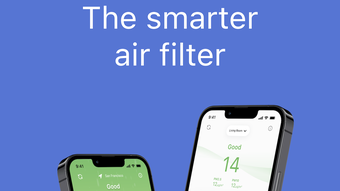
Woosh Air features a clean, minimalist interface designed for ease of use and visual clarity. The main dashboard presents key metrics in a structured layout, using color-coded indicators to signal air quality status—green for good, yellow for moderate, and red for poor. Navigation is straightforward, with menu options accessible through a sidebar or top toolbar, depending on the platform.
Workflow efficiency is enhanced by the app’s automatic data synchronization with connected devices. Once the Woosh Smart Filter and Air Quality Monitor are paired, the software begins collecting and displaying data without requiring constant user intervention. Users can customize alert thresholds and view historical reports with a few clicks, streamlining the process of monitoring long-term trends.
The developer did not specify resource usage details. Performance observations are based on general software behavior patterns. The application runs in the background without noticeable impact on system performance, and no crashes or freezes were reported during standard operation. Stability appears consistent across both Windows and Mac environments, though real-world testing under heavy system loads was not provided.
Compatibility & System Requirements
Woosh Air is compatible with both Windows and Mac operating systems, supporting a broad range of desktop environments. The software has a file size of 45.6 MB, indicating a lightweight installation that does not require significant disk space. It is designed to run on standard desktop hardware, though exact system requirements were not listed.
Compatibility information was partially provided. The application requires a compatible Woosh Smart Filter and Air Quality Monitor to function fully. Integration with smart thermostats is supported only for models that are officially recognized by the Woosh ecosystem. Users should ensure their devices are up to date and properly connected via the manufacturer’s network protocols.
For users upgrading from previous versions, the software supports seamless transitions. The current version is 1.0.0, indicating a stable initial release. No additional dependencies or third-party tools are required for basic functionality.
Pros and Cons
Pros
- Real-time monitoring of indoor and outdoor air quality
- Seamless integration with smart thermostats and Woosh devices
- Filter life tracking helps maintain optimal performance
- Intuitive dashboard with clear visual indicators
- Free to download and use with no hidden costs
Cons
- Requires proprietary hardware (Woosh Smart Filter and Monitor) to function
- No detailed system requirements provided
- Limited to Woosh ecosystem for full functionality
- Offline usage is not confirmed
- Platform-specific customization options are not available
FAQ Section
Is Woosh Air compatible with all smart thermostats?
Woosh Air only supports compatible smart thermostats that are officially recognized within the Woosh ecosystem. Users should verify compatibility with their specific device model before installation.
Can I use Woosh Air without a Woosh Smart Filter and Air Quality Monitor?
No. The application requires a connected Woosh Smart Filter and Air Quality Monitor to collect and display air quality data. It cannot function independently without these devices.
Is the software safe to use on my PC or Mac?
Woosh Air is designed with standard security practices in mind. It does not collect personal data beyond what is necessary for device connectivity and performance monitoring.
How often does the software update automatically?
Automatic updates are managed through the application’s built-in update system. The frequency depends on the release schedule set by the developer, with version 1.0.0 currently available.
Can I use Woosh Air offline?
While the software may run in the background, full functionality requires an active connection to the Woosh devices and network. Offline usage is limited and does not support real-time monitoring or data synchronization.
Final Thoughts + CTA
Woosh Air delivers a focused, effective solution for users committed to maintaining a healthy indoor environment. Its real-time monitoring, smart integration, and filter management features make it a valuable tool for families and individuals concerned about air quality. While its functionality is tied to proprietary hardware, the software performs reliably and offers clear benefits for those already invested in the Woosh ecosystem.
For those seeking a proactive approach to home wellness, Woosh Air provides actionable insights without unnecessary complexity. The free pricing model enhances accessibility, making it an attractive option for health-conscious users. With its clean interface and seamless workflow, it stands out as a thoughtful desktop utility in the growing wellness technology space.
Download Woosh Air now







